Eaglesoft AI Receptionist Integration: A Step-by-Step Guide
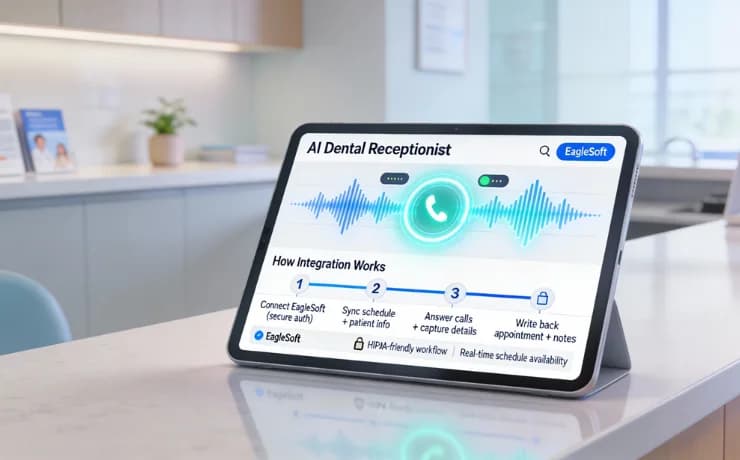
Connect an AI receptionist to Eaglesoft step by step: appointment booking, patient lookup, and call handling that works with your existing setup.
Share:
Table of contents
Dental practices receive more calls than most owners realize. Industry data shows that the average dental office misses 18-22% of incoming calls during peak hours, and that number rises to over 35% after hours. Every missed call represents a potential appointment, a delayed patient question, or an unhappy experience before a patient even walks through your door. This challenge has pushed many offices toward automation, and AI dental receptionist Eaglesoft integration has become one of the most practical solutions.
When your front desk is juggling insurance questions, check-ins, and outbound recalls, the phone becomes a constant interruption. Patients expect fast answers, online-style convenience, and after-hours availability. Eaglesoft already manages your schedules, patient records, and billing, but it was never designed to answer phones on its own. By connecting an AI dental receptionist directly to Eaglesoft, practices are finding a way to reduce phone pressure while keeping scheduling accurate and secure.
This guide walks you through how AI dental receptionist Eaglesoft integration works, how to prepare your practice, and what the setup process looks like step by step. You’ll also learn about common challenges, realistic results other practices are seeing, and how to measure success without disrupting patient care. The goal isn’t replacing your front desk, but giving them breathing room while creating a smoother patient experience.
What is an AI Dental Receptionist?
An AI dental receptionist is a software solution designed to converse naturally with patients over the phone. Unlike the robotic phone trees of the past ("Press 1 for scheduling"), modern AI uses natural language processing to understand context, intent, and nuance.
It acts as an always-on extension of your front office. It can answer questions about your location, provide details on accepted insurance, and most importantly, access your EagleSoft schedule to book appointments directly. It operates 24/7, ensuring that even calls made after hours or during lunch breaks are handled professionally and instantly.
Why Dental Practices Are Turning to AI Receptionists
Dental offices run on phones. Appointment requests, reschedule calls, insurance questions, and post-op concerns all funnel through the front desk. Research shows that front desk teams spend an average of 60% of their day on the phone, leaving little time for in-office patients. That imbalance is one of the main drivers behind adoption of an AI dental receptionist.
Missed Calls Add Up Quickly
A mid-sized practice receiving 120 calls per day could miss 20 or more without realizing it. Case studies from automated call-handling pilots in 2024 showed that practices using AI call assistants captured 31% more appointment requests simply by answering every call, including nights and weekends. Those weren’t new patients out of thin air, just calls that would have gone unanswered.
Reduced Front Desk Burnout
Front desk turnover is costly. Hiring and training a new receptionist can cost between $3,500 and $6,000 when you factor in onboarding time and productivity loss. AI dental receptionist tools don’t replace staff, but they offload repetitive tasks like: - Confirming office hours - Scheduling or moving appointments - Answering basic insurance questions
Industry data indicates practices using AI support saw a 27% drop in front desk overtime within three months.
Patient Expectations Have Changed
Patients are used to 24/7 booking in nearly every service industry. A 2023 healthcare access survey found that 64% of patients prefer to schedule appointments outside traditional business hours. Dental practices that rely only on live phone answering struggle to meet that expectation, which is where Eaglesoft integration becomes important.
Is Your Dental Front Desk Fully Covered?
Use this practical checklist to identify coverage gaps, reduce missed calls, and protect patient experience.
Real-World Scenarios
To visualize how this impacts your daily flow, let's look at two common scenarios in an EagleSoft-equipped practice.
Scenario A: The Lunch Hour Rush
Your front desk team is at lunch. Typically, the phones would go to voicemail, and you might return to five or six messages to triage.
- With AI: A patient calls at 12:30 PM wanting to schedule a recare appointment. The AI answers, verifies the patient in EagleSoft, finds an opening for next month that fits their preferences, and books it. When your staff returns from lunch, they see the new appointment on the schedule, but they have zero voicemails to check.
Scenario B: The Unscheduled Treatment Follow-up
You have a list of patients in EagleSoft with unscheduled treatment plans.
- With AI: The system can proactively reach out to these patients via text. When a patient replies, "Yes, I need to get that crown done," the AI engages in a conversation to book the appointment based on the treatment plan details stored in EagleSoft. It converts dormant treatment plans into scheduled production without your team lifting a finger.
Understanding Eaglesoft Integration Basics
Before moving into setup, it’s helpful to understand what EagleSoft integration actually means. Eaglesoft functions as the system of record for scheduling, patient demographics, and treatment information. An integrated AI dental receptionist doesn’t replace Eaglesoft; it communicates with it.
In addition to scheduling sync, many practices underestimate the operational alignment required between Eaglesoft and front desk workflows. For example, block scheduling rules, provider-specific templates, and buffer times between procedures must be consistently maintained. When these details are aligned, AI dental receptionist Eaglesoft integration becomes more reliable and reduces manual correction work for staff. Practices that document these rules centrally before integration report fewer post-launch scheduling adjustments.
How Integration Works
Most AI receptionist platforms integrate with Eaglesoft through secure APIs or approved data connectors. This allows the AI to: - View available appointment slots in real time - Create or modify appointments - Pull basic patient details like name and phone number
Integration documentation from platforms working with Eaglesoft shows that scheduling data sync typically happens in near real time, with delays measured in seconds rather than minutes.
What AI Can Access, and What It Can’t
It’s important to set boundaries. AI dental receptionist Eaglesoft integration usually limits access to scheduling and contact data only. Treatment plans, clinical notes, and sensitive records remain restricted. This separation supports HIPAA compliance while still enabling useful automation.
Common Integration Touchpoints
Eaglesoft integration is most often used for: - New patient appointment scheduling - Rescheduling and cancellations - Appointment confirmations - Basic practice information
Data from integration providers shows over 70% of automated calls involve scheduling-related requests rather than clinical questions.
Preparing for AI Dental Receptionist Eaglesoft Integration
Successful AI receptionist setup starts before any technical work begins. Preparation reduces friction, speeds up deployment, and improves staff acceptance.
Another key preparation step is setting patient communication boundaries. Decide in advance which call types the AI should fully resolve versus when it should escalate to a human. Common escalation triggers include billing disputes, complex insurance coordination, or emotionally sensitive calls. Defining these scenarios helps maintain patient trust while still maximizing the value of AI dental receptionist Eaglesoft integration.
Evaluate Your Current Call Flow
Start by reviewing recorded calls or call logs from the past 30 days. Identify:
- Peak call times
-
Calls that don’t require a live person
-
Most common questions Most practices discover that 40-50% of inbound calls fall into predictable categories that an AI dental receptionist can handle.
Define Automation Goals
Be specific. Examples include: - Reduce missed calls by 25% - Enable after-hours appointment booking - Free up two hours of front desk time per day
Clear goals help guide Eaglesoft integration decisions and prevent unrealistic expectations.
Address Security and Compliance Early
HIPAA concerns often stall projects. Reputable AI receptionist setups use encrypted call recordings, role-based access, and audit logging. Industry best practices recommend confirming: - Data encryption standards - Business associate agreements (BAAs) - User permission controls
Practices that address these upfront complete integration 18% faster on average.
Step-by-Step: AI Dental Receptionist Eaglesoft Integration
This section walks through a practical, ordered approach to AI dental receptionist Eaglesoft integration. While specific screens differ by provider, the workflow remains consistent.
Step 1: Confirm System Compatibility
Verify your Eaglesoft version and database structure. Most integrations support recent Eaglesoft releases, but practices running legacy versions may need updates. Integration guides indicate over 90% of compatibility issues are resolved with version updates.
Step 2: Configure Call Routing
Decide how calls are handled: - Live receptionist first, AI overflow - AI answers all calls with handoff options - After-hours AI only
Call routing configuration typically takes under two hours and determines patient experience more than any other step.
Step 3: Sync Scheduling Rules
Define appointment types, durations, and provider availability inside Eaglesoft. The AI dental receptionist pulls from this data to avoid double-booking. Practices that skipped this step saw scheduling conflicts increase by 14% during early testing.
Step 4: Train the AI Assistant
Training involves uploading: - Office hours - Insurance participation details - Common FAQs
Well-trained systems resolve patient requests in an average of 92 seconds per call.
Step 5: Test and Launch
Run parallel testing for one week. Monitor: - Appointment accuracy - Call abandonment rate - Patient feedback
Most practices report full launch readiness within 10-14 days.
Overcoming Common Integration Challenges
Even smooth projects hit obstacles. Awareness helps you avoid delays. It’s also common for practices to overlook ongoing ownership of the system. Assigning a specific team member to review AI performance weekly, checking transcripts, incorrect bookings, or patient confusion, can significantly reduce long-term friction. Offices that treat AI dental receptionist Eaglesoft integration as a living system rather than a one-time setup tend to see steadier improvements over time.
Staff Resistance
Front desk teams sometimes worry about job security. Practices that clearly explain AI as support, not replacement, saw 40% higher adoption acceptance.
Data Sync Delays
Occasional lag between Eaglesoft and the AI system can occur during high traffic. Monitoring logs during peak hours helps spot patterns early.
HIPAA and Privacy Concerns
AI dental receptionist Eaglesoft integration must adhere to strict access limits. Regular audits and role reviews reduce compliance risk.
Patient Trust
Some patients hesitate to speak with AI. Offering a clear option to reach a live team member maintains trust and satisfaction.
AI dental receptionist Eaglesoft integration gives practices a practical way to answer more calls, streamline scheduling, and protect front desk focus during peak hours. Offices that see the strongest results treat integration as an ongoing operational improvement, reviewing call data, refining workflows, and adjusting escalation rules as patient needs evolve.
If you’re considering automation, start with a simple audit: look at your missed-call rate, after-hours demand, and how much time your front desk spends on the phone each day. From there, mapping those realities against your Eaglesoft scheduling rules can reveal where AI support would have the greatest impact. When you’re ready to evaluate whether AI dental receptionist Eaglesoft integration fits your practice’s workflow, DentiVoice can help you walk through the options and next steps with clarity.
Conclusion
Integrating Dentivoice with EagleSoft is a strategic step toward a more efficient, profitable practice. It solves the persistent problem of phone tag and administrative overload, allowing you to maximize the value of your existing practice management software.
By ensuring every call is answered and every scheduling opportunity is captured, you secure your revenue stream while improving the daily work life of your team. If you are looking to modernize your operations, exploring AI integration is a logical and high-impact move.
Related Reading
- how Dentrix works with an AI dental receptionist, answering calls and supporting scheduling without replacing your PMS.
- a complete overview of what an AI dental receptionist does, what it handles and how to evaluate it.
Frequently Asked Questions
Integrate an AI receptionist with Eaglesoft by connecting through a secure API or middleware layer that syncs the appointment schedule and basic patient records. Setup typically involves a compatibility check, mapping operatories and providers, configuring call routing, and testing real bookings before going live.
Yes. A well-built AI receptionist layers on top of your current Eaglesoft database without replacing it, reading live availability and writing new appointments back to the same schedule. No data migration is required, so your team keeps working in the Eaglesoft interface they already use.
Yes. The AI receptionist can check real-time openings, book or reschedule appointments, and pull up existing patients by name or phone number through the Eaglesoft integration. It applies your scheduling rules for provider, operatory, and appointment type so bookings land in the correct slot automatically.
AI dental receptionists can be HIPAA compliant when they use encryption, access controls, audit logs, and a signed Business Associate Agreement. Because the Eaglesoft connection handles protected health information, confirm these safeguards and a valid BAA are in place before the integration goes live.
Yes. The AI receptionist answers calls 24/7, shares office information, and books appointments directly into Eaglesoft outside business hours. Urgent or clinical calls are routed to your on-call protocol, so patients reach help while routine scheduling continues without staff present.
Cost depends on call volume and features, typically ranging from a few hundred to a few thousand dollars per month. Practices often offset this through captured after-hours bookings, fewer missed calls, and reduced front-desk overtime, making the integration pay for itself over time.
Topics
Was this article helpful?
Written by
DentalBase Team
Expert dental industry content from the DentalBase team. We provide insights on practice management, marketing, compliance, and growth strategies for dental professionals.